Santa Mars

Laki-laki, 18 tahun

Malang, Indonesia

Banggalah pada dirimu sendiri, Meski ada yang tak Menyukai. Kadang mereka membenci karena Mereka tak mampu menjadi seperti dirimu.
::
Start
Windows 8 SM Versi 3
Shutdown

Navbar3

Search This Blog

Showing posts with label technology. Show all posts

Saturday, September 15, 2012

Merubah Foto Menjadi Karikatur Melalui HP | Android App

Karikatur adalah merupakan seni merubah bentuk wajah/badan manusia  menjadi sebuah kartun dengan bentuk yang tidak biasa namun unik. Biasanya, karikatur digunakan sebagai media ilustrasi atau sekedar sindiran untuk institusi tertentu atau bahkan untuk karya seni. Untuk membuat karikatur banyak sekali caranya baik menggunakan software/aplikasi editor foto.  Perlu keahlian khusus jika kita ingin membuat sebuah karikatur menggunakan editor grafis seperti Photoshop, Corelddraw atau yang lainnya. Namun jaman semakin canggih, Kita tidak perlu repot-repot menggunakan cara diatas jika kita  mempunyai Smartphone Android. Kita dapat memanfaatkannya untuk merubah foto menjadi karikatur yang unik.

Untuk dapat merubah foto menjadi karikatur di Android diperlukan sebuah aplikasi yang mendukung pembuatan karikatur tersebut, dan saat ini banyak aplikasi tersebut disediakan di Google Play dan bisa Anda download secara gratis.  Salah satu Aplikasi yang cukup bagus untuk merubah foto menjadi karikatur adalah Caricature Me – Photo Deformer, aplikasi ini dikembangkan oleh stoik.com.
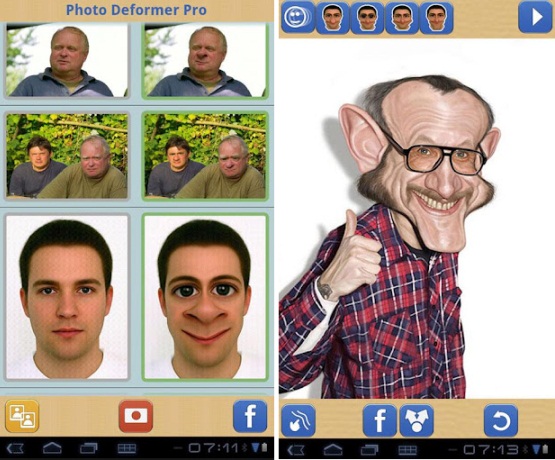


Dengan menggunakan aplikasi tersebut kita bisa secara langsung mengedit foto kita menjadi sebuah karikatur, dengan memanfaatkan menu yang sudah disediakan.  Aplikasi ini akan secara otomatis mendeteksi wajah pada foto, kemudian tinggal kita pilih model karikatur wajah yang bagaimana yang kita inginkan.  Setelah karikatur jadi kita dapat share hasil nya ke teman-teman kita melalui Facebook, MMS atau bahkan melalui email.   Waw..asik ya..!!

Berikut beberapa fitur Caricature Me:
  • Pendeteksi wajah otomatis dan fitur 1 sentuh dalam menghasilkan karikatur
  • Mode Manual untuk kreasi sendiri
  • Facebook download/upload
  • Support Multi-touch
  • 7 alat deformasi, masing-masing dapat diterapkan dengan 3 ukuran
  • Animasi Real time
  • Support Kamera
  • Rendering/pencerahan gambar ukuran penuh (Pro)
  • Menyimpan gambar yang sudah dirubah dengan nama yang berbeda
  • Menyimpan gambar yang sudah dirubah sebagai animasi GIF
  • Kirim gambar yang sudah dirubah melalui email, MMS dll
  • Kirim gambar yang sudah dirubah sebagai animasi GIF
Bagaimana? Tertarik untuk menginstallnya di Android Anda? Caricature Me terbagi menjadi dua versi yaitu yang gratis dan yang pro.
Untuk Caricature Me versi gratis Download disini, sedangkan untuk versi pronya download disini.
Pada versi pro, tidak terdapat iklan pada Aplikasi dan dapat menyimpan ukuran gambar/foto yang besar dengan rendering terbaik.

Tuesday, September 11, 2012

Making the Smartphone As a Laptop

Clambook is an accessory device that is able to change the smartphone functionality into a laptop. With this device, the smartphone can be used like a laptop that has a keyboard, multitouch trackpad, speakers, a speaker, as well as the monitor screen.


Clambook device is expected to change the outlook on smartphone. If all this is only used with limited functionality as a mobile gadget, well, Clambook will make it different.
This product has the advantage that is able to adapt to the various platform operating system (IOS and Android) and hardware, including also compatible with Motorola mobile phones equipped with Webtop.

To move the smartphone functionality into a laptop, users must connect to other devices with Clambook SFM cable. As with the iPhone, Android, or other uses a combination of USB 2.0 and HDMI port.

With her ​​wide-screen display ratio of 16:9, Clambook quite comfortable to use for watching videos and having special Android navigation buttons. Simply put, Clambook be described as a "shell" is energized by a smartphone or tablet.

This innovative step made ​​by the company having previously made ​​to increase the ranks Clamcase iPad functions in order to have a functioning laptop with built-in keyboard and a leg.

Hopefully with Clambook, smart phone users will get a similar experience, that is by increasing the function of the mobile phone into a laptop functions. Companies scheduled to begin Clambook present in the market from this year's holiday season.

PC on fire screensaver - The Burning effects

PC on fire screensaver - The effects of burning on the PC screen.

In this post, i will share about the burning effect screensaver. This  is amazing, the screen will look burned  to the accompaniment of classical  music. Of most  screensavers that I've encountered, this  is a screen saver which I think is best, with an excellent display and configuration that can be adjusted to make me  want to share to the public.

Here's a screenshot:

Download screensaver for free :


Joli OS (Operating System)

World of technology is growing very rapidly, after some OS (Operating System) that already exist, such as Windows, Mac OS, Linuk, now appears a new operating system that you deserve to try. Joli is Operating System Ubuntu-based GNU / Linux that developed by the Company Jolicloud. The operating system itself is called "Jolicloud" until version 1.2, when a company named "Joli OS". The product name "Jolicloud" now refers to a cloud desktop to manage Web applications, files, services, and as a computer operating system.


Before installing Joli OS on the computer (either virtual), you should first create an account on the official site Jolicloud. Even without an account you can still get into Joli OS using your Facebook account. And it should be noted that, when Joli OS installed, you'll go to the computer by using the account admin / user / root that you created as Windows or Linux in general. Jolicloud while to get into, you will need your account in Jolicloud cloud.

You will go to the desktop with cloud-style display with a little nuance Chromium KDE Plasma Netbook. Please continue to Joli OS installation options. There are seven basic steps in the installation options, start by selecting a language and ends with the approved configuration. In between them there are to choose a username and password, computer name, choose a time zone, select the type of netbook / notebook / computers are used in accordance with the branding / brand it. Yes, all the standards in the installation of the operating system and is quite easy to understand. But if you install a dual-boot, so be careful when selecting the partition with the presence of other operating systems.

Joli is also a very good OS for old computers, because this OS is lightweight and extremely well suited for netbooks. Joli OS is free, and you can download on the official site that I have provided above.

Monday, September 10, 2012

Robot Penjaga Pantai Akan Hadir di Jepang

Robot Penjaga Pantai akan segera hadir di Jepang, informasi ini di kutip dari Ghiboo.com. Disana dikatakan bahwa sebuah temuan yang awal mulanya diperuntukkan untuk mengetahui teknik renang terbaik malah menjadi sebuah prototipe untuk robot penjaga pantai.

Hal tersebut di kemukakan oleh para peneliti Institut Teknology Tokyo belum lama ini. Robot yang dinamai Swumanoid ini dapat berenang dengan kecepatan 0,64 M/s (sepertiga dari kecepatan pemegang rekor renang dunia).

Swamanoid di rancang untuk dapat berenang dengan bergabagai gaya, diantaranya adalah gaya dada, gaya kupu-kupu dan gaya bebas.
Seperti yang telah di katakan oleh ketua peneliti Motomu Nakashima, Ia mengatakan "Karena robot ini yang bisa berenang, maka kelak swamanoid dapat menolong orang yang sedang menghadapi bahaya air. Saya percaya ini akan terjadi di masa depan" dilansir oleh Dailymail (9/9)

Berikut beberapa gambar proses pengerjaan swamanoid.


Lalu, apakah peran manusia akan sepenuhnya digantikan oleh Robot ini? Tentu saja tidak, manusia akan tetap menjadi tokoh utama dalam segala hal, robot hanya sebagai pembantu saja untuk mengurangi resiko bahaya pada manusia yang mungkin terjadi. Robot diprogram untuk melakukan perintah-perintah tertentu dan tidak dapat melakukan hal-hal di luar perintah program tersebut.

Swamanoid (robot penjaga pantai) masih membutuhkan persiapan yang panjang agar dapat benar-benar siap di terjunkan sebagai penjaga pantai, karena masih banyak kendala yang belum bisa di selesaikan. Seperti daya tahan dan anti air.